Roads
Command
From CSV CommandDifficultyintermediateAdded2027.0StatusdraftImport Alignment Command
Description:
Imports a horizontal alignment from a .csv file.
Location on Compact Ribbon:
Location on Extended Ribbon:
Instructions:
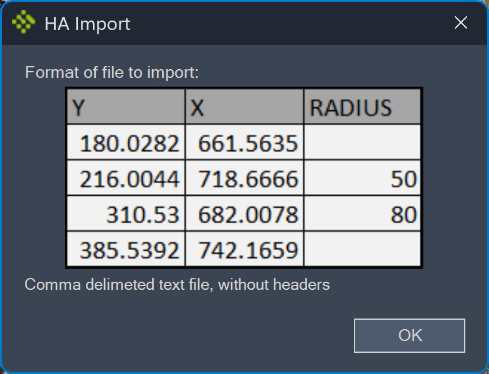
The format of the file must be as follows:
The columns represent the Y, X and radius. If the radius is not specified, a PI with no curve will be created. Commas should be used as a delimiter.
To import a horizontal alignment, follow these steps:
-
Run the command. A file format preview will be displayed:
-
Browse to the .csv file.
The horizontal alignment is inserted into a new site called Devotech:
If you need to import more alignments from a text file, rename the imported alignment otherwise the new alignment will overwrite it.