Import ARR Rainfalls Command
Description:
Imports ARR data and creates rainfall time series patterns to be used by the TUFLOW analysis.
Location on Compact Ribbon:
Location on Extended Ribbon:
Instructions:
This command imports temporal patterns from the ARR Data Hub website (https://data.arr-software.org), and the rainfall depths from the Bureau of Meteorology website (https://www.bom.gov.au), and combines them to create rainfall time series that can be used for storm analysis. The imported time series will be added to the pipe manager / manage and analyze library.
-
Run the command.
-
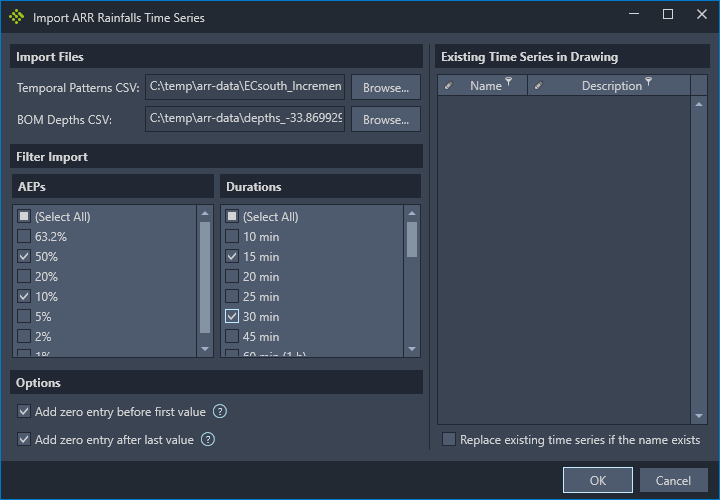
Click the Browse… buttons and select the temporal patterns increments CSV file, and the BOM IDF rainfall depths CSV file.

-
Select which AEPs and durations must be imported.

-
The increments file does not start with a zero multiplier, therefore, if the time series must start with a zero depth or end with a zero depth, choose the appropriate option. It is important to start and end with zero depths for a TUFLOW analysis.

-
If there are existing time series in the library, they will appear on the right side of the dialog. If the temporal patterns are being reimported the option to replace existing time series can be ticked. This will update the existing time series values, that have the same name as the time series that are being imported, with the new rainfall depths.

Below is the complete dialog with all options selected: