Culverts CommandDifficultyintermediateAdded2027.0StatusdraftImport Culverts Command
Description:
Creates culverts from a CSV file. The culverts can be imported along an alignment.
Location on Compact Ribbon:
Location on Extended Ribbon:
Instructions:
The CSV file can contain any data but must at least contain either a culvert station (chainage) or coordinate values representing the start and end position of the culvert. A CSV file example is shown below (the order of the properties is not important because the Import Culvert window allows to match the properties to any column):
-
Run the command.
-
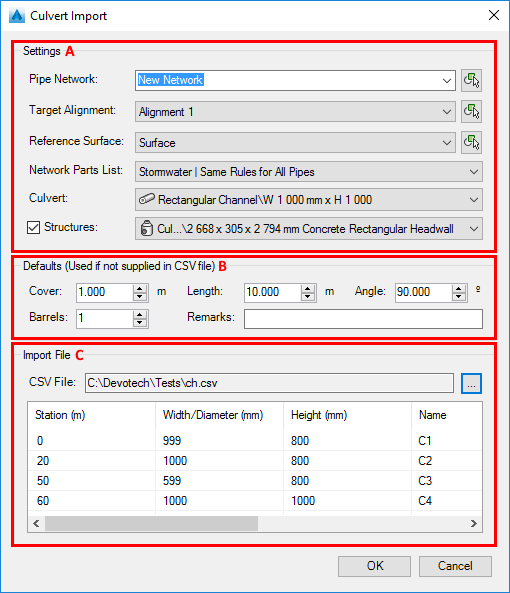
The dialog that appears contains three parts (see image on the next page):
-
Settings – This section contains all the required entities that you must specify (alignment, surface, pipe and structure). When the software compares the culvert sizes to the parts list it will only look at the pipe family of the selected culvert. If structures are not required, the checkmark next to the structure can be unticked.
-
Defaults – These settings will be applied to the culverts if the information is not available in the CSV file that is being imported.
-
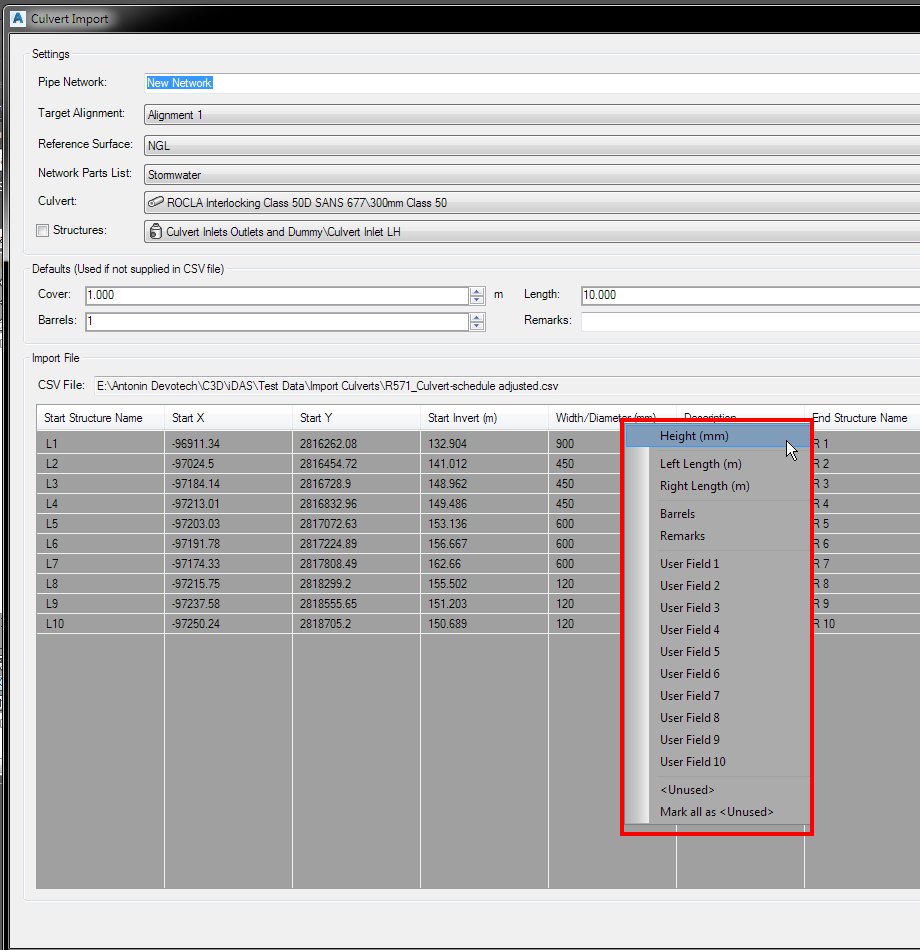
Import – A CSV file must be specified, each column header can then be right-clicked and mapped to the data that is in the column. The Station column or columns relating to the start and end coordinates must be specified in order to complete the import (the OK button will be enabled when all criteria are met).
Right click on the column heading to assign a property to the column:
-