Move Labels CommandDifficultyintermediateAdded2027.0StatusdraftMove Point Labels Command
Description:
Moves multiple COGO point labels simultaneously to reduce the number of overlapping labels.
Location on Compact Ribbon:
Location on Extended Ribbon:
Instructions:
-
Run the command.
-
Select the COGO points:

-
Specify the distance the labels must be placed from the COGO point centre:

-
Specify the method to use when determining the label placement:

The chosen method will affect how the labels are arranged relative to the point centre positions.
Methods:
-
Centroid based A centroid position is determined from averaging all the coordinates of the COGO points. Then a direction is determined which is a straight line between a COGO point and the centroid. Finally the label is placed along the direction line at the specified distance away from the point.

-
Reference point based The user will be asked to specify a point (red cross in the image below). The direction from the point to the COGO point centre will be used to determine the label location. The label is then placed along the direction line at the specified distance away from the point.

The command runs in a loop so that additional COGO points can be selected and processed easily. The command also remembers the user's choices from the previous time. Therefore the user can repeatedly hit Enter or Space to use the same values as the previous time.
- Line based
The user will be asked to specify a line start and end point. The angle of the line, from the start point to the end point, will be used to place the label at the specified distance away from the point.


The image below is the result of an angle of 45 being provided.
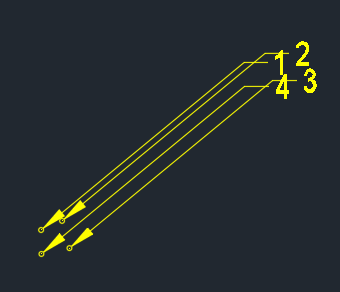
-
Angle based The user will be asked to provide and angle in degrees. The label will be placed at the specified distance away from the point at the angle provided.

The image below is the result of an angle of 45 being provided.