Rename from Structures Command
Description:
This command renames the profile views using the first and the last structure names. It can also be used to rename the alignments. The alignments must be displayed in the plan view to select them.
Location on Compact Ribbon:
Location on Extended Ribbon:
Instructions:
-
Click on the command in the ribbon.
-
Select the pipe network, choose what you want to rename and click OK:
-
Select the objects that needs to be renamed (alignments or profile views)
The renamed profile view in the Prospector:
If you want to display the profile view name under the profile view, the profile view style needs to be adjusted. In the default Devotech template the profile view style displays the alignment name:
-
Select the profile view, right-click and select the Edit Profile View Style command:
-
Go to the Title Annotation tab and click on the A icon:
-
Select the <[Parent Alignment(CU)]> field:
-
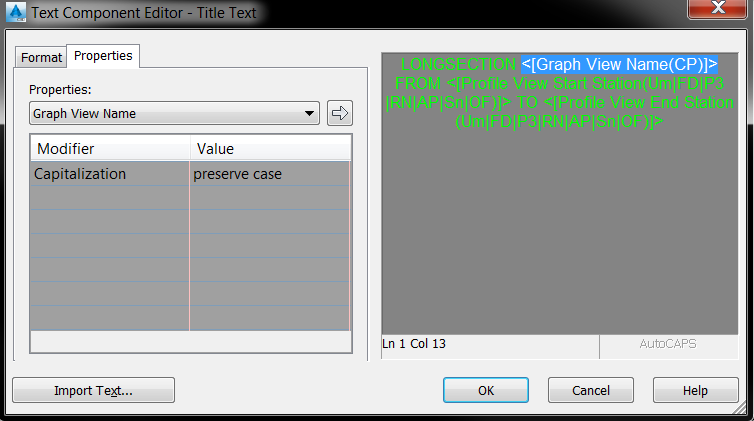
In the Properties drop-down menu select Graph View Name and click on the white arrow to add the property to the label:
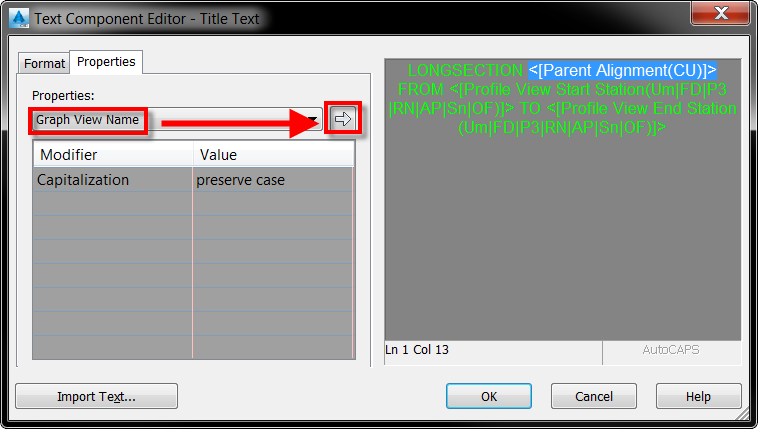
The adjusted label: